Discover the 12 screens
The experience opens with a birthday countdown, then takes the visitor through 12 main screens. Each one adds a different moment to the celebration.
- 1. Welcome — personalize the recipient’s name, heading, introduction and button label so the first moment feels made just for them.
- 2. Balloon Wishes — visitors pop balloons to discover short wish words. Make the wishes personal, cheerful or funny; the balloon pop sound can be customized through the scene’s audio editor.
- 3. Birthday Candles — create a classic birthday moment. Customize the available text and birthday details, then invite the recipient to make a wish.
- 4. The Birthday Cake — the cake board displays a name. Visitors can drag the knife across the cake to cut a slice.
- 5. Bouquet — add a warm, thoughtful pause with birthday messages and available editable text.
- 6. Sweet Moments — five memory cards. Give each card a title and a message about a favourite memory, meaningful conversation, shared laugh or something you appreciate about the recipient.
- 7. The Envelope and Letter — an envelope opens to reveal a personal letter. Replace the sample letter with your own words.
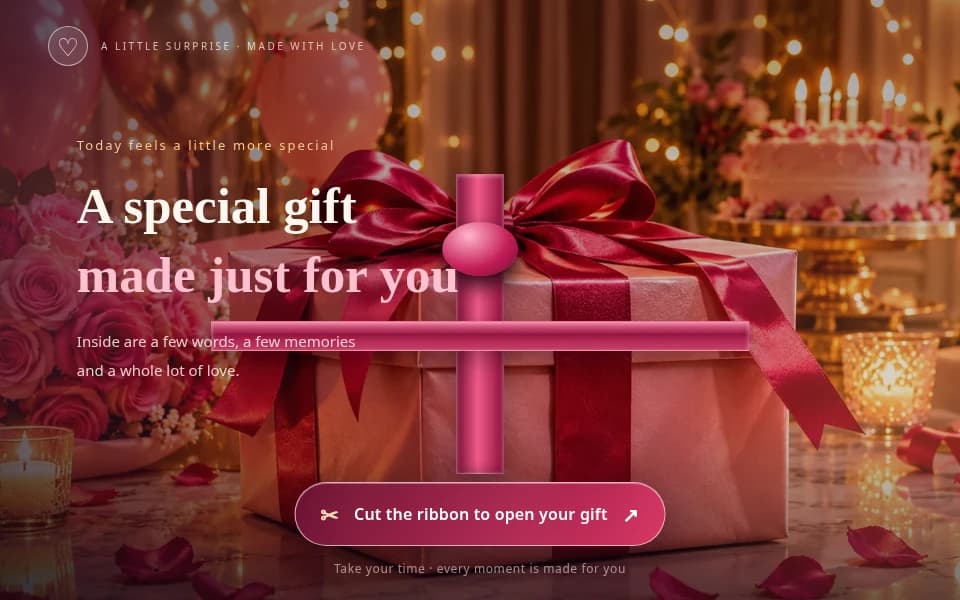
- 8. Surprise Gift — an interactive gift-box reveal with a voice prompt and opening effects. Related audio tracks can be managed from the shared music editor.
- 9. 3D Heart — a dedicated 3D heart-themed scene that adds a dreamy visual transition.
- 10. Galaxy of Memories — six photo positions and editable headings, labels and messages. Add photographs that tell your story.
- 11. Cherry Blossom World — floating petals and glowing flowers, with editable text and notes connected to the glowing flowers.
- 12. Interactive Garden — visitors tap to grow flowers, and a random birthday message appears as flowers bloom. Edit the random-note collection, garden text and the See Your Friend button label and destination link.
How to create your birthday website: step by step
You do not need a coding background. The visual Builder lets you select editable content in the preview and change it in the editor.
- 1
Open Wishly and sign in
Visit Wishly and log in to your account. Open the website builder or template selection area.
- 2
Choose The Birthday Experience
Find the Premium Birthday Experience template and open it in the Builder.
- 3
Get familiar with the Builder
You will see the website preview and editing controls. Use the Previous and Next arrow buttons over the preview to move between the template’s screens while editing.
- 4
Click or tap the part you want to change
Select highlighted text, a photo, a button or another editable item in the preview. On desktop, click it; on a phone or tablet, tap it.
- 5
Make your changes in the shared edit box
The editor opens beneath the preview. Replace the text or image, make your changes and press Done. The preview updates so you can see the result.
- 6
Personalize the Welcome screen
Start with the birthday recipient’s name, welcome heading, introduction, special-day message and button label.
- 7
Write the Balloon and Candle messages
Move to those screens and update the available labels, instructions and birthday wishes.
- 8
Add the name to the Cake
Set the cake-board name and check that it displays the way you want.
- 9
Make the Bouquet personal
Update its messages and any editable content that you want to tailor to the recipient.
- 10
Fill in the five Moments cards
Give each memory a distinct title and message. Use real moments and details rather than repeating the same wish.
- 11
Write the letter
Open the Envelope screen and replace the sample letter with your own words. Read it once more to check names and spelling.
- 12
Personalize the Gift and 3D Heart screens
Update the available text and review the gift voice and sound options.
- 13
Upload your six Galaxy photos
Open each photo editing option, choose a picture and update its caption or related text. Use a mix of meaningful photographs that work well together.
- 14
Edit the Cherry Blossom notes
Personalize the visible headings and messages, along with the notes attached to the glowing flowers.
- 15
Prepare the Garden
Edit the random bloom messages one by one, adjust the garden text, then set the See Your Friend button label and destination URL.
- 16
Choose your colours and fonts
Open Settings in the Builder. Choose one of the available colour presets or enter a custom HEX colour. The available fonts include Original, Quicksand, Dancing Script, Bubblegum Sans, Comic Neue and Caveat.
- The Birthday Experiencebirthday · Live demo

Personalize the music
Music is part of the atmosphere in the audio-enabled screens. Use the Change Music control below the relevant scene to open the shared audio editor. You can preview the current track, upload or replace it, and restore the default music when needed.
Some scenes also have interaction-triggered sounds, such as balloon pops and the Gift scene’s voice and opening effects. These related audio options are managed alongside that scene’s music.
- Browsers can block sound until the visitor interacts with a page. If music does not start immediately in the Builder preview, tap or click inside the preview once.
- Keep the volume comfortable while editing.
Preview, save and publish
Before sharing your website, take a moment to experience it from beginning to end.
- Use Preview to see the experience as a visitor would.
- Check the site on desktop, tablet and mobile layouts.
- Try the balloon interaction, cake cutting, envelope, gift reveal and Garden flower interaction.
- Check all names, photo choices, captions, notes and button destinations.
- Listen to the music and interaction sounds at a comfortable volume.
- Use Save Draft if you want to keep your work and return later.
- When everything is ready, choose Create Live Link and follow the publishing flow.
- Your changes are automatically saved while you work. Once the live link is created, open it yourself to make one final check before sending it to the birthday recipient.
Why is The Birthday Experience a Premium template?
When Wishly started, the intention was not to make templates paid. The goal was to let everyone create and share beautiful wish websites.
Operating a platform like Wishly comes with ongoing expenses—hosting, storage, media delivery, maintenance and the infrastructure needed to keep the experience running. To help cover these costs and keep improving the platform, Wishly is introducing selected Premium templates. The Birthday Experience is one of those Premium templates.
The regular price is $5.00 and the special launch price is $2.99, a saving of $2.01 compared with the regular price. The purchase is one-time and gives lifetime access to this template on the buying Wishly account.
You do not need to buy a Premium template to enjoy Wishly. Free templates remain available, and more free options will continue to be added. Choose The Birthday Experience if its 12-scene birthday journey feels worth it to you.
Make a birthday more than a message
A favourite photograph, a letter written from the heart, a shared memory and a small interactive surprise can mean a lot. Bring those moments together with The Birthday Experience and create a birthday website they can explore at their own pace. Made with love by Wishly.
- The Birthday Experiencebirthday · Live demo
Common questions
Do I need coding skills to create this birthday website?
No. The visual Builder lets you select editable content in the preview and change it in the editor.
How many main screens are included?
There are 12 main screens, preceded by an opening birthday countdown.
How many photos can I add to Galaxy of Memories?
The Galaxy scene includes six photo positions.
Can I edit the music and sound effects?
Yes. Use Change Music to open the shared audio editor and manage the relevant tracks and scene sounds.
Why is The Birthday Experience Premium?
Wishly introduced selected Premium templates to help cover ongoing hosting, storage, media delivery, maintenance and infrastructure costs while continuing to offer free templates.
Do I need to buy it again to use it later?
No. One purchase gives lifetime access to The Birthday Experience on the buying Wishly account.